ComEd
- 4.0
- Rating
- 500.00K
- Installs
- Free
- Price

 Analysis by App-foxy
Managing an electricity account from a phone sounds simple until you need to do it while away from home, in a parking lot, or during a busy morning. I spent time with ComEd to see how well it handles that kind of practical task. This free business app from An Exelon Company is aimed at ComEd customers who want account access in a mobile setting rather than relying on a desktop browser.
My overall impression is that ComEd is most useful as a focused account companion. It is not trying to replace every household finance tool or become a general energy-management platform. Its value comes from putting the customer relationship in a familiar mobile space, where checking information or taking care of an account-related task can be more convenient than opening a laptop.
The important catch is that the experience depends heavily on connectivity. When the app can reach its online services, the phone becomes a practical doorway to account information. When the connection is weak or unavailable, the usefulness of that doorway naturally becomes limited. That distinction matters more here than it would in an app designed mainly for offline reference.
You May Also Like

 Blood Strike: 2.5 Anniversary
Blood Strike’s Loadouts Turn Every Drop Into a Tactical Gamble
A close look at Blood Strike’s custom loadouts: how fast access to signature weapons reshapes its battle royale rhythm, rewards preparation, and narrows the gap between fights.

 Pandora - Music & Podcasts
Pandora’s Music Is Easy to Start, but Harder to Recover
Pandora’s strength is its low-effort path from a seed to a station. Its weak spot is how much confidence it asks you to place in connection, setup, and quiet recovery.

 8 Ball Pool
8 Ball Pool Is Built on Rivalries, Rematches, and Routine
A close look at the rivalries, rematches, shared routines, and unanswered safety questions that turn a quick pool match into a persistent mobile community.

 Samsung Music
Samsung Music’s Quiet Strength Is Playing What You Already Own
Its reach comes less from spectacle than from dependable access to a personal library. That simplicity is both the app’s strongest retention engine and its ceiling.

 AccuWeather: Weather Radar
AccuWeather Review: A Quick, Clear Forecast for Everyday Decisions
For everyday plans, the best forecast is the one you can understand quickly. AccuWeather makes rain timing, radar, and local conditions easy to act on, with a few trade-offs.

 Hill Climb Racing
Why Hill Climb Racing Still Turns Crashes Into One More Run
A tiny car, a bumpy hill and one more upgrade: Hill Climb Racing keeps resurfacing because its simple chaos makes every near-miss feel personal.
More From Our News Desk



What ComEd feels like in everyday use
The app sits in the business category, but it does not feel like a complicated office tool. I would describe it as a customer-service utility for people who want to deal with electricity-account matters without being tied to a computer. The store summary presents it as a way to access account information on the go, and that is a fair description of its central purpose.
In a normal household routine, I can imagine opening it after receiving a reminder about an account, while checking household expenses, or when I need to look at information connected with my ComEd service. The benefit is not excitement; it is reducing the number of steps between a question and the account screen that may answer it.
That narrow focus is also a strength. A specialized utility app is easier to understand than a general provider portal buried inside a large website. At the same time, users should approach it with the right expectations. If you want broad advice about reducing energy use, detailed home automation, or a full personal budgeting system, this is unlikely to be the only tool you need.
The app has been available since Apr 18, 2012, and its current version is 26.2.0. Those details suggest an established service rather than a newly launched experiment. It supports Android 7.0 and later, which makes it accessible to people using older Android phones, although the smoothness of the experience will still depend on the phone itself, its browser components, and the quality of the network connection.
Why the phone context changes the experience
On a desktop, it is easy to keep several tabs open, compare a bill with a bank account, or retrieve information while sitting at a desk. A phone is different. You may be standing in a store, riding as a passenger, waiting for an appointment, or trying to solve a household question between other tasks. ComEd makes more sense in those short windows than as an app you browse for long periods.
I find that mobile account apps work best when I already know what I need. If my goal is to check a particular piece of account information, the smaller screen feels worthwhile. If I am exploring several pages or trying to understand a complicated issue, a larger browser window may be more comfortable. That is not a failure specific to this app; it is an important trade-off of handling utility administration on a phone.
A useful habit is to open the app before you are under pressure. For example, if you are preparing a household budget, checking account information in advance gives the app time to load and lets you deal with sign-in friction while you are calm. Waiting until you are rushing out the door is when a weak signal, an expired session, or a forgotten credential becomes most annoying.
Connectivity is part of the product
ComEd is fundamentally tied to online account access. The information you want is associated with a live customer account, so the app needs a working path to its services. On a reliable home connection or a strong mobile signal, that relationship feels natural: open the app, wait for the account view, and continue with the task.
The experience changes in places with poor reception. A basement, an underground garage, a rural road, or a crowded public venue can turn a quick check into a waiting exercise. I would not treat the app as something to depend on for account information when I know I will be disconnected. Instead, I would use it ahead of time to review anything important before leaving a dependable connection.
This is one of the less obvious points about a utility app: connectivity is not just a technical detail in the background. It shapes when the app is useful. A customer who mainly uses home Wi-Fi may find it dependable, while someone who expects to access it from changing locations may notice more interruptions. The same app can therefore feel smooth one day and inconvenient the next, even when nothing about the account has changed.
Another practical tip is to avoid repeatedly tapping a control when a page appears slow. With an online service, a delayed response may mean the request is still moving through the network. Repeated attempts can create confusion about whether an action happened once or several times. I prefer waiting briefly, checking the resulting screen, and then trying again only when it is clear that the first attempt did not complete.
What happens when something goes wrong
Every account app has moments when the problem is not obvious. The phone may show a weak connection, the session may need attention, or a page may take longer than expected. In ComEd, the sensible recovery process is simple: confirm the connection, give the screen a moment, and reopen the app if it appears stuck. If the issue continues, switching between Wi-Fi and mobile data can help identify whether the network is the cause.
I also recommend keeping your sign-in details available through a secure method rather than relying on memory during an urgent moment. This is especially helpful when you have not opened the app for a while. A mobile utility tool is convenient only if you can get past the account-access step without turning a quick task into a longer search.
When an account page does not load, I would not immediately assume that the account itself has a problem. Network interruptions, a temporary service issue, or an interrupted session can all look similar from a small screen. Closing and reopening the app is a reasonable first step, but important account questions may still be better handled through ComEd’s regular customer-service channels if the mobile route remains unavailable.
That limitation is worth stating clearly for households that need certainty at a particular moment. I would use the app for routine access and quick checks, but I would not make it my only plan for a time-sensitive account dispute or a situation where I need direct assistance. The app can shorten the path to information; it cannot remove every reason a customer might need a human support channel.
Using it without wasting mobile data
Because ComEd is an account-access tool rather than an entertainment app, I would expect ordinary sessions to be relatively purposeful. Still, a data-conscious approach makes sense when using mobile service. I tend to open it when I have a clear task, complete that task, and close it instead of leaving it running while I move between locations.
Wi-Fi is the more comfortable choice when I am reviewing several account screens or dealing with a matter that may require patience. Mobile data is useful when the task is urgent or I am away from home, but a poor signal can be less efficient than waiting for a stable connection. The real saving is often time and repeated loading rather than obsessively monitoring every short session.
There is also a privacy angle to mobile account access. I would avoid opening account details on a shared device or handing an unlocked phone to someone else. If I am using the app in public, I keep the screen angled away from nearby people and avoid leaving the account view visible after finishing. These are small habits, but utility accounts can contain information that deserves the same care as other personal services.
Notifications and background behavior are areas where I prefer restraint. I only want a business app to interrupt me when an alert is genuinely useful. If ComEd becomes too noisy on a particular phone, reviewing the device’s notification controls is a practical way to keep the app available without allowing it to dominate the day. The goal is to make account access convenient, not to turn a utility account into a constant stream of prompts.
Where it fits beside the usual alternatives
The obvious alternative is using the ComEd website in a mobile browser. That approach can be better when you need a wider layout, want to compare multiple browser tabs, or are already working on a computer. It may also feel more natural for someone who rarely manages accounts through installed apps.
The dedicated app has a different advantage: it keeps the service in a direct, recognizable place on the phone. For customers who check their account periodically, that can be faster than remembering a web address, opening a browser, and navigating from the beginning each time. I prefer the app for short, repeatable tasks and the browser for longer sessions where screen space matters.
A banking app or budgeting app can help answer a different question: how an electricity payment fits into overall spending. Those tools are useful for financial planning, but they are not substitutes for accessing the provider account itself. Likewise, a smart-home or energy-monitoring product may offer household insights, yet it serves a different purpose from a provider-focused account app.
This distinction helps identify the right user. ComEd is a good fit for a customer who wants a direct mobile route to account information and is comfortable with online services. It is less suitable for someone who prefers handling every utility matter by phone, someone with an unreliable data connection, or someone expecting detailed energy analysis and home-control features from the same application.
Who will appreciate it most
I would recommend ComEd to customers who manage their own household responsibilities and want fewer barriers when checking their account away from a desk. It is especially practical for people who already use their phone for banking, scheduling, and other service accounts. The familiar pattern of opening an app, signing in, and checking what matters can make a normally dull task easier to fit into a busy day.
It can also help people who share household duties. If one person usually handles electricity matters while another is away from home, having a mobile access point may reduce dependence on a single computer. That does not eliminate the need to protect account credentials, but it does make the service easier to reach during ordinary errands and travel.
I would be more cautious about recommending it to someone who uses an older phone with limited storage, has little patience for online sign-in steps, or lives in an area where connectivity frequently drops. The minimum Android requirement is modest, but compatibility alone does not guarantee a pleasant experience. A supported phone with a weak network is still a frustrating combination.
The app is free and rated for Everyone, which removes two common barriers for households deciding whether to try it. Its reach is also substantial: it has passed 500 thousand installs, with an average rating of 4.0 from around 16 thousand ratings. Those figures suggest that it is a familiar option for many users, while the rating also encourages realistic expectations rather than blind enthusiasm.
Small habits that make the app more dependable
My first recommendation is to use ComEd at a calm moment before you need it urgently. Sign in, look around, and learn where the information you commonly seek is located. This turns a future emergency-style check into a routine action and exposes any account or connection problem early.
Second, choose the network deliberately. Use stable Wi-Fi for a longer review, and reserve mobile data for a quick check when the signal is strong. If the screen is slow, do not assume that repeated taps will speed it up. Waiting, confirming the result, and then retrying is safer than creating duplicate actions or losing track of what happened.
Third, treat the app as one part of your account-management routine. Keep a secure way to access your credentials, know how to reach regular customer support, and use a browser when the phone layout becomes restrictive. This approach avoids expecting one small mobile interface to solve every possible account question.
Finally, close the session when you finish, particularly if you are using a shared or public device. Convenience should not come at the expense of leaving personal account information visible. The best mobile workflow is quick, deliberate, and easy to repeat without exposing more information than necessary.
My connectivity verdict
After using ComEd as a practical account tool, I see its main value in convenience rather than breadth. It gives ComEd customers a focused way to reach account information from a phone, which is useful when a computer is not nearby. The experience is strongest when the connection is stable and the user approaches each session with a specific purpose.
Its weaknesses are closely related to that same design. A poor signal can interrupt the flow, a small screen can make detailed account work less comfortable, and the app should not be treated as a replacement for every customer-service route. People looking for energy monitoring, financial planning, or smart-home controls will need other tools alongside it.
Still, for the right customer, I think ComEd earns a place on the phone. It is free, available to Everyone, maintained in a current version, and built around a straightforward need rather than unnecessary distractions. If you want quick mobile access to your ComEd account and usually have a reliable connection, I would recommend trying it. If your priority is offline access, extensive analysis, or complex account support, I would choose the browser or another specialized service for those parts of the job.
FAQs for ComEd
01What is the ComEd app used for?
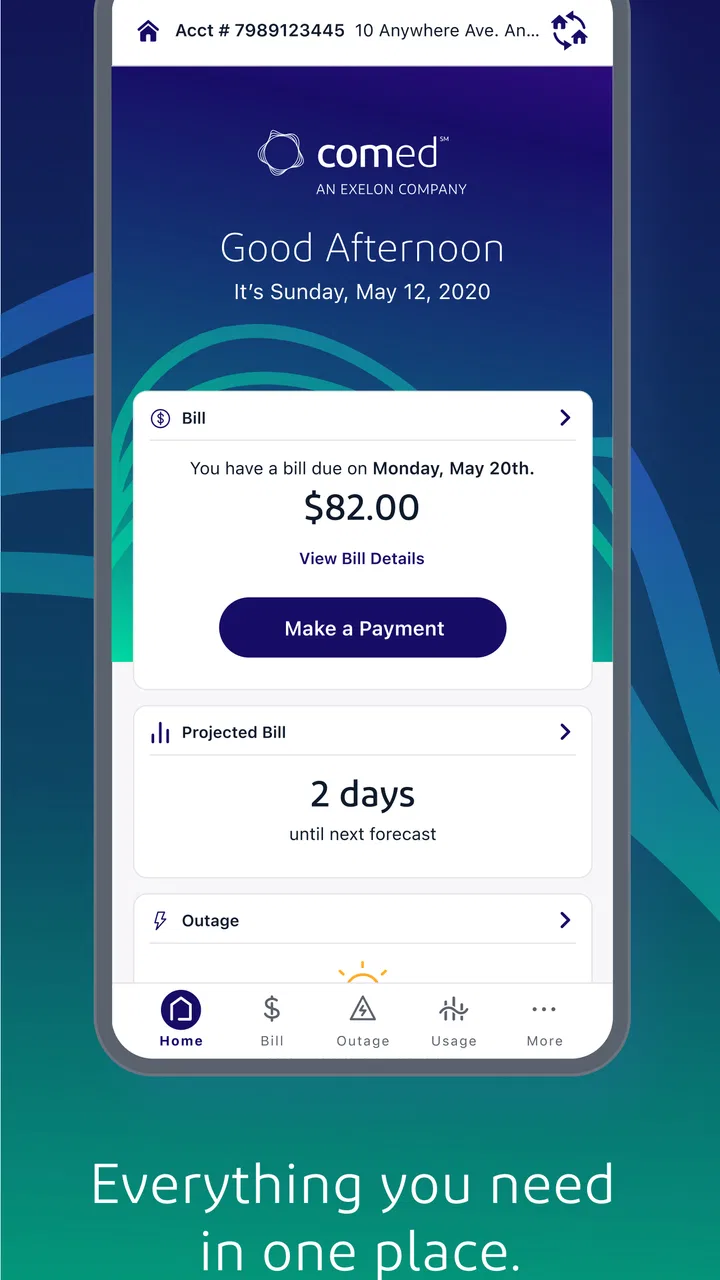
The ComEd app is designed for customers of Commonwealth Edison to manage their electricity account from an Android or iOS device. After signing in, users can review bills, check payment history, make a payment, monitor energy usage, update account details, and report or check the status of an outage. Available tools may vary depending on the account type and service location.
02Can I pay my ComEd electricity bill through the app?
Yes, eligible customers can generally use the ComEd app to view their current balance and pay an electricity bill. The app may support linked bank accounts, debit cards, or credit cards, depending on the payment options offered by ComEd. Before confirming a payment, carefully check the amount, processing date, and any applicable convenience fees or restrictions.
03Can I report a power outage with the ComEd app?
The app provides outage-related tools for ComEd customers, including the ability to report an outage and view information about known interruptions in the service area. It may also show estimated restoration details when available. During a widespread outage, information can change quickly, so users should refresh the app and follow any safety instructions provided by ComEd.
04Does the ComEd app show my energy usage and usage history?
ComEd customers may be able to view electricity consumption information through the app, including recent usage patterns, billing details, and comparisons across different periods. These features can help identify changes in household consumption and support energy-saving decisions. The amount of detail displayed may depend on your meter, account configuration, billing cycle, and available ComEd data.
05Is the ComEd app free and safe to download?
The official ComEd app is generally free to download, although normal mobile data charges may apply if you use it without Wi-Fi. For safety, download it only from the official Google Play Store or Apple App Store and verify that the publisher is ComEd. Avoid unofficial copies, and use a strong password and device security features when accessing your utility account.
Pros
- View and pay your ComEd bill directly from the app.
- Report power outages and receive restoration updates quickly.
- Monitor your electricity usage with helpful consumption insights.
- Manage multiple ComEd accounts from one convenient dashboard.
- Find energy-saving programs and personalized efficiency resources.
Cons
- Some features require an active ComEd account and verified login.
- Outage information may take time to update during major emergencies.
- Usage data may not appear immediately after recent electricity consumption.
- Payment processing options and fees can vary by account or method.
- The app is mainly useful for ComEd customers in its service area.

ComEd
Gallery